How do I secure the screen in windy conditions?
For maximum stability, use both securing methods as described below.
Method 1: Guy Ropes and Ground Stakes
-
Insert each ground stake into the ground at an appropriate location.
-
Tie a knot at the end of each guy rope.
-
Attach the rope to the guy rope buckle on the frame.
-
Pull the rope through the buckle and hook it onto the ground stake.
-
Hold the rope near the screen end.
-
Pinch and slide the buckle upward to tighten the rope.
-
Repeat these steps for all four guy ropes.
Method 2: Water Bags
-
Open the water bag lid.
-
Fill the bag completely with water (up to 20 kg maximum).
-
Close the lid securely.
-
Place the filled water bag firmly against the base of the screen.
-
Repeat for all four water bags.


23 undefined
Our 200” Inflatable Screen — True Outdoor Cinema Experience


Dimensions of the 200-inch screen
Screen Cleaning Guidelines
What should I do if the air pump won’t turn on?
How do I check the battery level?
Dimensions of the 120-inch screen
How do I charge the air pump?
How do I mount the Nebula X1 Pro speakers on the screen?
How do I repair a tear in the inflatable frame?
Why is the connection between the screen air valve and the hose adapter so tight?

16.7 ft Silent Inflatable Theater Screen User Guide (D0120)
16.7 ft Silent Inflatable Theater Screen Benutzerhandbuch (D0120)
16.7 ft Silent Inflatable Theater Screen Guía del Usuario (D0120)
16.7 ft Silent Inflatable Theater Screen Guide de l'utilisateur (D0120)
16.7 ft Silent Inflatable Theater Screen 用户指南 (D0120)
16.7 ft Silent Inflatable Theater Screen Uživatelská Příručka (D0120)
View More


Important Safety Instructions for the Inflatable Screen
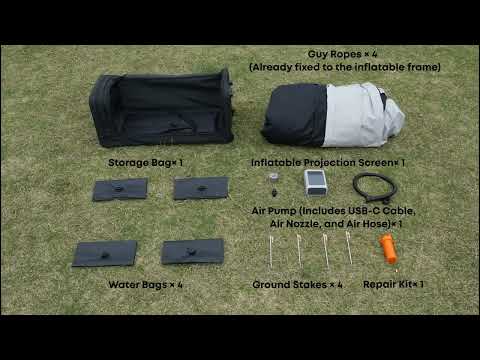
How to Unbox the Inflatable Screen
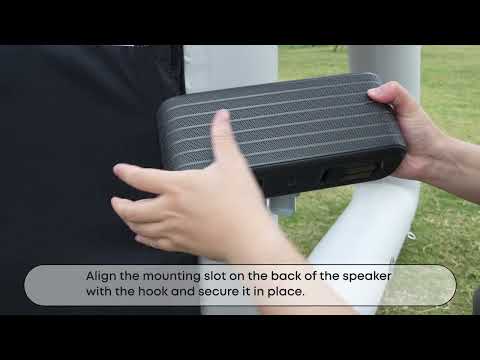
How to Mount the Nebula X1 Pro Front Surround Speaker
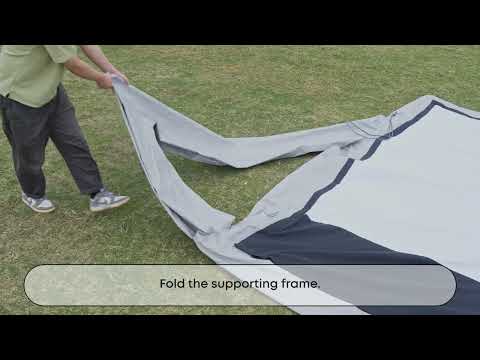
How to Deflate and Store the Inflatable Screen
Important Safety Instructions for the Inflatable Screen
How to Unbox the Inflatable Screen
View More