Thank you for supporting our product.
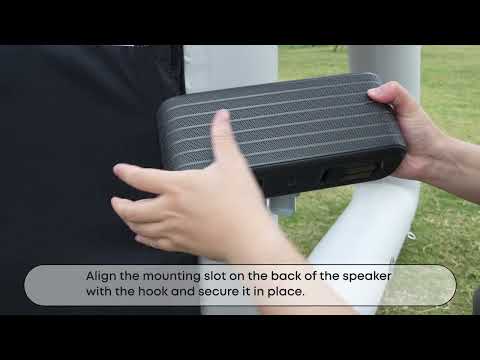
The screen includes dedicated mounting slots designed specifically for the X1 Pro front surround speakers.
Mounting Steps:
-
Open the speaker mounting hook on the screen frame.
-
Locate the mounting slot on the back of the X1 Pro front surround speaker.
-
Align the speaker’s slot with the hook.
-
Gently secure the speaker in place.
-
Repeat the steps for the second front surround speaker.
Before Storage
Remove both speakers from the screen.
Close the speaker mounting hooks to protect them.
Benefits
Provides optimal speaker positioning for balanced audio quality.
Integrated design — no separate speaker stands are required.
Keeps speakers at ear level, ensuring an immersive listening experience.
Tip
If you need visual guidance, scan the QR code on the product packaging to access a Support Video that demonstrates all installation steps in detail.
If you have any other questions, please don't hesitate to contact Nebula Customer Support at service@soundcore.com for further assistance.