Dimensions of the 200-inch screen
Thank you for supporting our product.
5786mm (L)x 3340mm (H) x 2099mm (W)
Equivalent to 228 in (L) x 131 in (H) x 83 in (W)
If you have any other questions, please don't hesitate to contact Nebula Customer Support at service@soundcore.com for further assistance.


22 undefined
Our 200” Inflatable Screen — True Outdoor Cinema Experience


Dimensions of the 200-inch screen
Screen Cleaning Guidelines
What should I do if the air pump won’t turn on?
How do I check the battery level?
How do I charge the air pump?
How do I mount the Nebula X1 Pro speakers on the screen?
How do I repair a tear in the inflatable frame?
Why is the connection between the screen air valve and the hose adapter so tight?
What should I do if the pump stops before the screen is fully inflated?

16.7 ft Silent Inflatable Theater Screen User Guide (D0120)
16.7 ft Silent Inflatable Theater Screen Benutzerhandbuch (D0120)
16.7 ft Silent Inflatable Theater Screen Guía del Usuario (D0120)
16.7 ft Silent Inflatable Theater Screen Guide de l'utilisateur (D0120)
16.7 ft Silent Inflatable Theater Screen 用户指南 (D0120)
16.7 ft Silent Inflatable Theater Screen Uživatelská Příručka (D0120)
View More


Important Safety Instructions for the Inflatable Screen
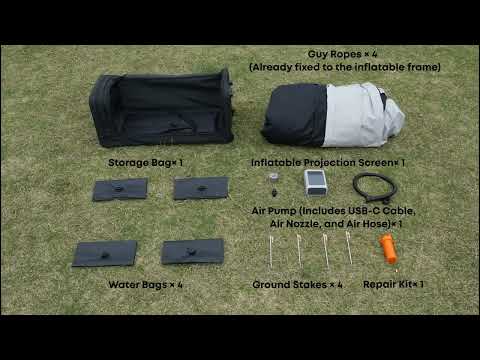
How to Unbox the Inflatable Screen
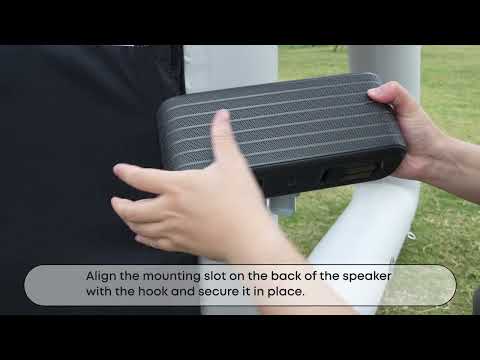
How to Mount the Nebula X1 Pro Front Surround Speaker
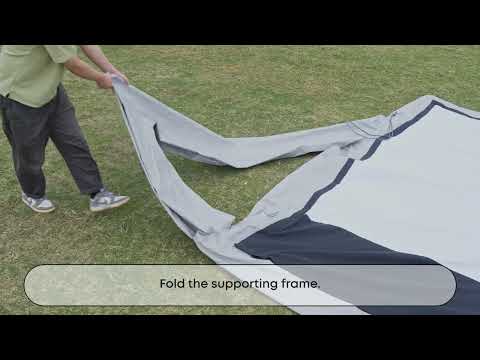
How to Deflate and Store the Inflatable Screen