How do I update the SpaceFlow D2090 firmware?
Thank you for supporting our product.
Q: How do I update the SpaceFlow D2090 firmware?
A:Keeping your SpaceFlow up to date is easy:
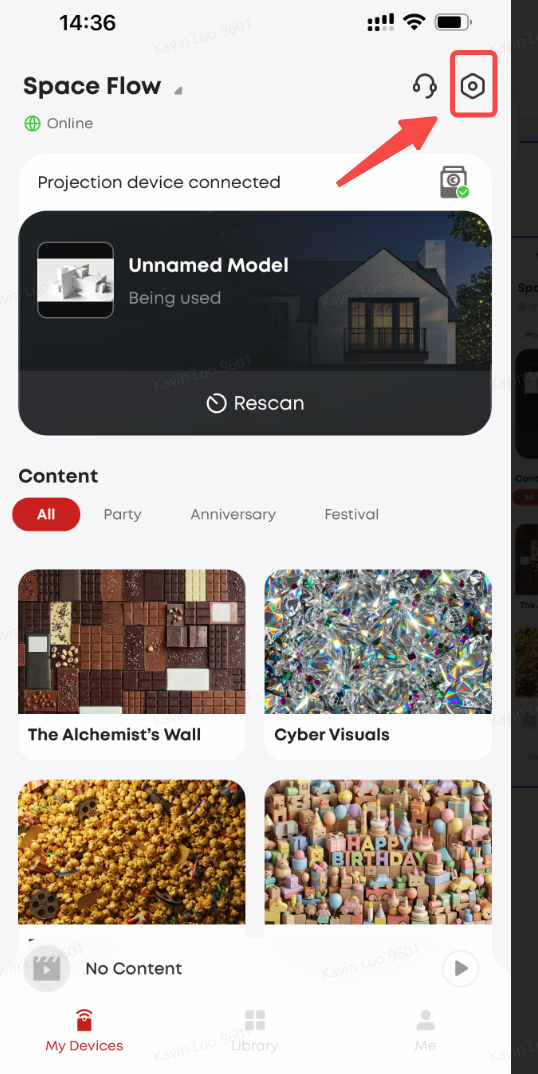
1. The app will show a pop-up when a new version is available
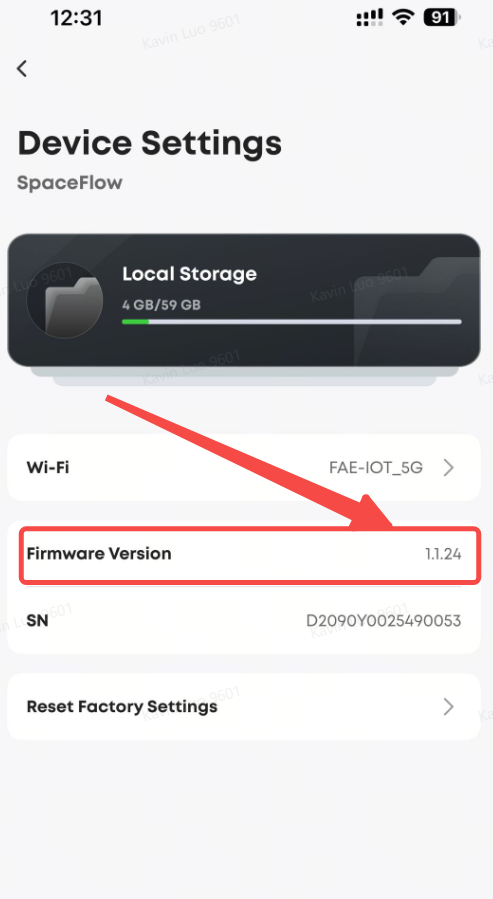
2. You can also check manually under Device Details > Firmware Version
3. Tap "Update Now" to start downloading (it downloads in the background, so you can keep using your SpaceFlow)
4. When the download is complete, choose "Restart Now" or "Restart Later"
5. Your SpaceFlow automatically switches to the new firmware after restarting
Simple as that!
If you have any other questions, please don't hesitate to contact Nebula Customer Support at service@soundcore.com for further assistance.


61 undefined

D2410_Apollo_Manual
D4111_Capsule_Manual
D2421_Capsule II_Manual
D2323_Mars II Pro_Manual
D2150_Cosmos_Max_Manual
D2400_Astro_Manual
View More


SpaceFlow-How to Cast Mapping Videos
SpaceFlow-Complete Setup and Usage Guide
SpaceFlow-How to Update Device Firmware(OTA)

SpaceFlow-How to Generate a Mapping Video
SpaceFlow-How to Scan and Create a Space Model
SpaceFlow-How to Connect SpaceFlow
View More