How do I edit the scanned space model?
Thank you for supporting our product.
Q: How do I edit the scanned space model?
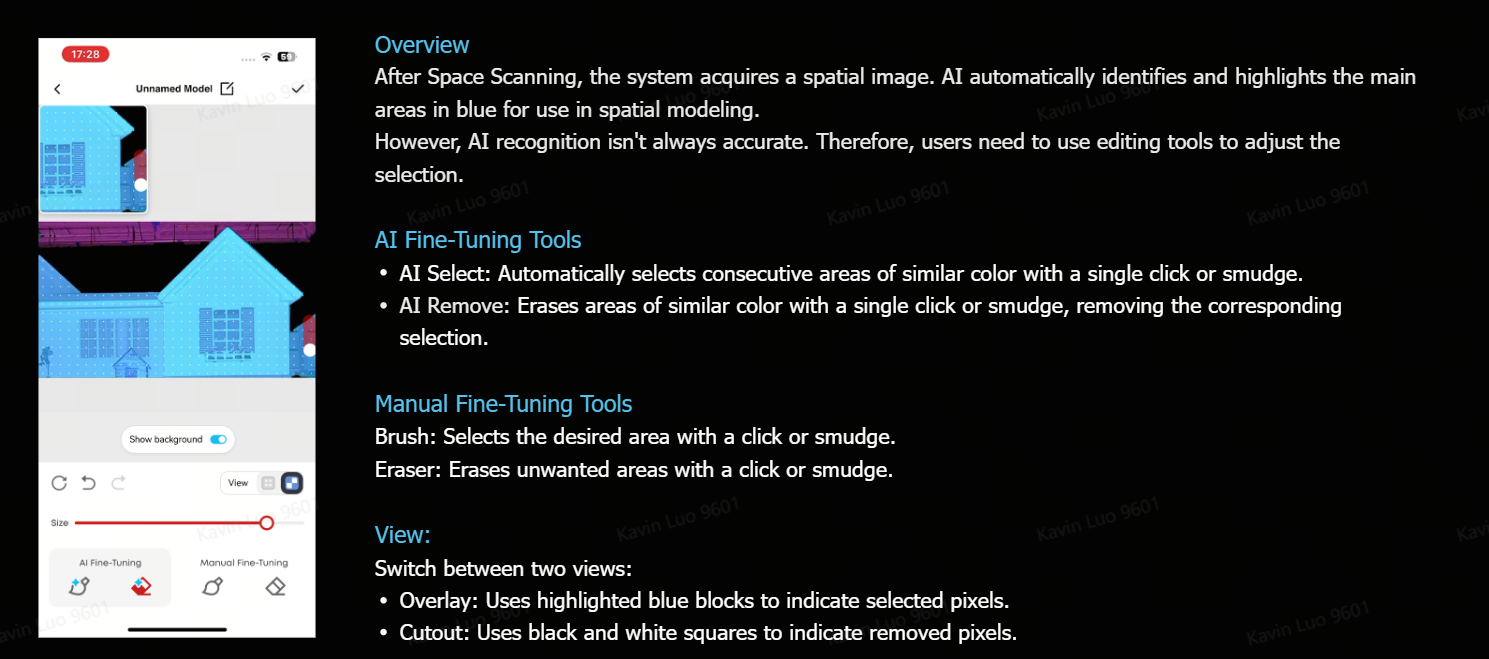
A:Getting into edit mode is simple — two ways to get there:
• Right after scanning: Tap "Edit Model" directly
• From saved models: Go to your model list, pick the one you want, and tap Edit
Once you're in, you've got four tools at your fingertips:
• AI Add — Paint over an area and let AI smartly add connected regions
• AI Remove — Paint over an area to intelligently deselect regions
• Brush — Pixel-by-pixel precision for detailed edge work
• Eraser — Undo selections with surgical precision
Pro tip: Zoom in before fine-tuning — it makes a big difference!
If you have any other questions, please don't hesitate to contact Nebula Customer Support at service@soundcore.com for further assistance.


61 undefined

D2410_Apollo_Manual
D4111_Capsule_Manual
D2421_Capsule II_Manual
D2323_Mars II Pro_Manual
D2150_Cosmos_Max_Manual
D2400_Astro_Manual
View More

SpaceFlow-How to Cast Mapping Videos
SpaceFlow-Complete Setup and Usage Guide
SpaceFlow-How to Update Device Firmware(OTA)
SpaceFlow-How to Generate a Mapping Video
SpaceFlow-How to Scan and Create a Space Model
SpaceFlow-How to Connect SpaceFlow
View More